Order example: methods and property groups
This example shows methods, workflow dialogs, and property groups on one Order page.
The sample runs at /documentation/order in Benevia.Core.Blazor.Samples.
Its C# type is DocsOrder; its UI label is Order.
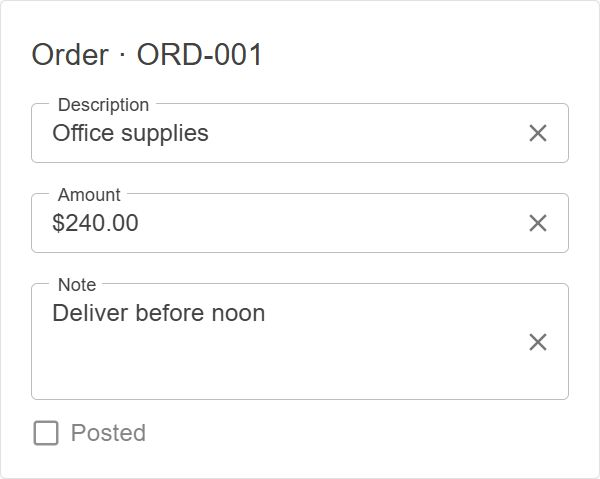
Try it
Use separate local PostgreSQL databases for this demo. Set the connections in environment variables or local configuration. Use the same tenant settings for the integration tests and TestAPI. For a new database, run this command once to create the sample administrator account:
dotnet test Tests/Benevia.Core.Integration.Tests --filter FullyQualifiedName~BasicAuthIntegrationTests
Then start TestAPI with demo data enabled and the Blazor sample:
dotnet run --project Tests/Benevia.Core.TestAPI --launch-profile http
dotnet run --project Tests/Benevia.Core.Blazor.Samples
Run these commands in separate terminals. TestAPI creates the demo records at startup.
The sign-in page creates sample users. Sign in as method-showcase and open
the Order page.
| Action | Expected result |
|---|---|
| Edit Amount, then leave the field | The Order saves. Refresh invoice targets to see only Amount copied to the linked Invoice. |
| Click Post | The success message appears. Post becomes disabled; Description and Amount become read-only. |
| Check the split buttons after posting | The first button shows Change note. The button using PrimaryAction shows Undo post. |
| Click Change note, edit, then Apply note | The dialog saves the note and closes. Cancel discards the dialog's edit. |
| Select Archived | Internal note disappears. Clear Archived to show it again. |
| Click Copy to draft | Amount and Note copy to the existing draft. Refresh invoice targets to see both. |
| Click Undo post | Description and Amount become editable again. |
Each Invoice panel has its own dataset. Click Refresh invoice targets after changing the Order.
Apply note changes Note through a handler. The ChangedBy.Direct check skips this change, so the Invoice note stays unchanged.
Follow the guides
- Methods: define Post and UndoPost, save changes, and show a success message.
- Method Buttons: run methods and use server rules to enable buttons.
- Split Buttons: group actions and choose the primary method.
- Workflow Dialogs: edit a note, then save or cancel.
- Server Property Groups: lock, hide, and copy selected fields.
Server models
The code below comes from the working sample. It uses these shared imports:
global using Benevia.Core.Annotations;
global using DataTypes = Benevia.Core.Events.DataTypes;
DocsOrder and its group markers
using System.ComponentModel.DataAnnotations;

namespace Benevia.Core.TestAPI.Documentation;

/// <summary>Fields locked when an order is posted.</summary>
public sealed class PostedFields : IPropertyGroup;

/// <summary>Fields hidden when an order is archived.</summary>
public sealed class InternalFields : IPropertyGroup;

/// <summary>Fields copied between orders and invoices.</summary>
public sealed class SharedFields : IPropertyGroup;

/// <summary>The small order example used throughout the methods and property-groups documentation.</summary>
[ApiEntity]
[Display(Name = "Order")]
[PropertyGroup<PostedFields>]
[PropertyGroup<InternalFields>]
[PropertyGroup<SharedFields>]
public partial class DocsOrder
{
    /// <summary>The order number.</summary>
    [Property<DataTypes.IdText>("Order number")]
    public partial string DocNumber { get; set; }

    /// <summary>A description locked after posting.</summary>
    [Property<DataTypes.Text>("Description")]
    public partial string Description { get; set; }

    /// <summary>The amount shared with invoices.</summary>
    [Property<DataTypes.Currency>("Amount")]
    public partial decimal Amount { get; set; }

    /// <summary>A note that remains editable after posting.</summary>
    [Property<DataTypes.MultilineText>("Note")]
    public partial string Note { get; set; }

    /// <summary>An internal note hidden while archived.</summary>
    [Property<DataTypes.Text>("Internal note")]
    public partial string InternalNote { get; set; }

    /// <summary>Whether the order is posted.</summary>
    [ApiAccess(PropertyAccess.ReadOnly)]
    [Property<DataTypes.Boolean>("Posted")]
    public partial bool IsPosted { get; set; }

    /// <summary>Whether internal fields are hidden.</summary>
    [Property<DataTypes.Boolean>("Archived")]
    public partial bool IsArchived { get; set; }

    /// <summary>The method selected as the computed split button's main action.</summary>
    [Virtual]
    [Property<DataTypes.Text>("Primary action")]
    public partial string PrimaryAction { get; }

    /// <summary>The existing invoice receiving individual field edits.</summary>
    [ReferenceProperty("Linked invoice", DeleteAction.SetNull)]
    public virtual partial Invoice? LinkedInvoice { get; set; }

    /// <summary>The existing invoice receiving an explicit whole-group copy.</summary>
    [ReferenceProperty("Draft", DeleteAction.SetNull)]
    public virtual partial Invoice? Draft { get; set; }

    /// <summary>Posts the order and saves the request.</summary>
    [Method("Post", MethodType.Modify, SaveOnCompletion = true)]
    public partial void Post();

    /// <summary>Reopens the order and saves the request.</summary>
    [Method("Undo post", MethodType.Modify, SaveOnCompletion = true)]
    public partial void UndoPost();

    /// <summary>Opens a virtual dialog without changing the order.</summary>
    [Method("Change note", MethodType.Read)]
    public partial NoteDialog ChangeNote();

    /// <summary>Copies shared fields to the existing draft and saves the request.</summary>
    [Method("Copy to draft", MethodType.Modify, SaveOnCompletion = true)]
    public partial void CopyToDraft();
}
Invoice copy target
namespace Benevia.Core.TestAPI.Documentation;

/// <summary>A target for individual edits and whole-group copying.</summary>
[ApiEntity]
[PropertyGroup<SharedFields>]
public partial class Invoice
{
    /// <summary>The invoice number, which is outside the shared group.</summary>
    [Property<DataTypes.IdText>("Invoice number")]
    public partial string DocNumber { get; set; }

    /// <summary>A description outside the shared group.</summary>
    [Property<DataTypes.Text>("Description")]
    public partial string Description { get; set; }

    /// <summary>The shared amount.</summary>
    [Property<DataTypes.Currency>("Amount")]
    public partial decimal Amount { get; set; }

    /// <summary>The shared note.</summary>
    [Property<DataTypes.MultilineText>("Note")]
    public partial string Note { get; set; }
}
NoteDialog
using Benevia.Core.Workflows;
using System.ComponentModel.DataAnnotations;

namespace Benevia.Core.TestAPI.Documentation;

/// <summary>A temporary note editor whose changes commit only after confirmation.</summary>
[Virtual]
[ApiEntity]
[Display(Name = "Change note")]
public partial class NoteDialog : IWorkflowDialogConfirmable
{
    /// <summary>The order being edited.</summary>
    [VirtualReferenceProperty("Order")]
    public partial DocsOrder Order { get; set; }

    /// <summary>The proposed note.</summary>
    [Virtual]
    [Property<DataTypes.MultilineText>("Note")]
    public partial string Note { get; set; }

    /// <inheritdoc />
    [Method("Apply note", MethodType.Modify)]
    public partial void Confirm();
}
Server logic
This file defines the methods, primary action, property group rules, and dialog confirmation.
CopyTo copies one changed property. Copy copies the whole group.
Both need an existing target in the same EventContext. Neither creates or saves records.
OrderBL, InvoiceBL, and NoteDialogBL
using Benevia.Core.Events.LogicBuilders;
using Benevia.Core.Events.LogicContainers;

namespace Benevia.Core.TestAPI.Documentation;

/// <summary>Methods and server property groups for the documentation example.</summary>
[Logic]
public class OrderBL(DocsOrder.Logic order)
{
    /// <summary>Registers method behavior and the computed main action.</summary>
    [RegisterLogic]
    public void Methods()
    {
        order.Method(o => o.Post)
            .DisableIf(o => o.IsPosted)
            .Do(o => o.IsPosted = true)
            .OnSuccess("Order posted.");

        order.Method(o => o.UndoPost)
            .DisableIf(o => !o.IsPosted)
            .Do(o => o.IsPosted = false);

        order.Compute(o => o.PrimaryAction)
            .From(o => o.IsPosted ? nameof(DocsOrder.UndoPost) : nameof(DocsOrder.Post))
            .DirtyBy(o => o.IsPosted);

        order.Method(o => o.ChangeNote).Do((o, args) => new NoteDialog(args.Context)
        {
            Order = o,
            Note = o.Note
        });

        order.Method(o => o.CopyToDraft)
            .DisableIf(o => o.Draft == null)
            .Do(o =>
            {
                if (o.Draft is { } draft)
                    order.PropertyGroup<SharedFields>().Copy(o, draft);
            })
            .OnSuccess("Shared fields copied to draft.");
    }

    /// <summary>Locks posted fields, hides archived fields, and copies direct shared edits.</summary>
    [RegisterLogic]
    public void PropertyGroups()
    {
        order.PropertyGroup<PostedFields>().Add(o => new { o.Description, o.Amount });
        order.PropertyGroup<PostedFields>().ReadOnly().If(o => o.IsPosted);

        order.PropertyGroup<InternalFields>().Add(o => o.InternalNote);
        order.PropertyGroup<InternalFields>().Hidden().If(o => o.IsArchived);

        order.PropertyGroup<SharedFields>().Add(o => new { o.Amount, o.Note });
        order.PropertyGroup<SharedFields>().Changed().Do((o, args) =>
        {
            if (args.ChangedBy == ChangedBy.Direct && o.LinkedInvoice is { } invoice)
                args.CopyTo(invoice);
        });
    }
}

/// <summary>Registers the receiving fields on invoices.</summary>
[Logic]
public class InvoiceBL(Invoice.Logic invoice)
{
    /// <summary>Declares compatible group members.</summary>
    [RegisterLogic]
    public void SharedProperties() => invoice.PropertyGroup<SharedFields>().Add(i => new { i.Amount, i.Note });
}

/// <summary>Applies the note through the ordinary order setter.</summary>
[Logic]
public class NoteDialogBL(NoteDialog.Logic dialog)
{
    /// <summary>The dialog host commits after this confirmation succeeds.</summary>
    [RegisterLogic]
    public void Confirm() => dialog.Method(d => d.Confirm)
        .Do(d => d.Order.Note = d.Note)
        .OnSuccess("Note updated.");
}
Demo records
using Benevia.Core.API.Database;
using Benevia.Core.DataGenerator;
using Benevia.Core.DataGenerator.Attributes;
using Benevia.Core.DataGenerator.Interfaces;
using Benevia.Core.Events;

namespace Benevia.Core.TestAPI.Documentation;

/// <summary>Creates the three synthetic records shown in the documentation.</summary>
public class OrderDemoData : ICreateData
{
    /// <summary>Creates distinct initial values so copying is visible.</summary>
    [DataGenerator(DataKind.DemoData, 2)]
    public void Create(IDataContext dataContext, EventContext context)
    {
        _ = dataContext;
        var invoice = new Invoice(context)
        {
            DocNumber = "INV-001", Description = "Linked invoice", Amount = 80m, Note = "Invoice note"
        };
        var draft = new Invoice(context)
        {
            DocNumber = "DRAFT-001", Description = "Existing draft", Amount = 25m, Note = "Draft note"
        };
        _ = new DocsOrder(context)
        {
            DocNumber = "ORD-001", Description = "Office supplies", Amount = 120m,
            Note = "Deliver before Friday", InternalNote = "Check stock before posting",
            LinkedInvoice = invoice, Draft = draft
        };
    }
}
The TestAPI already registers its generated model, logic, and endpoints. For another app, follow application configuration to register the generated services. Rebuild after changing the models.
Clients cannot edit IsPosted directly through the API. They use Post and UndoPost.
Permissions
The sample's Method showcase responsibility grants these permissions:
access.Entity<DocsOrder>().CreateAndDelete()
    .WriteForAllProperties().Read(o => o.PrimaryAction).AllowAllMethods();
access.Entity<Invoice>().CreateAndDelete()
    .WriteForAllProperties();
access.Entity<NoteDialog>().CreateAndDelete()
    .WriteForAllProperties().AllowAllMethods();
Put these calls inside AddResponsibility. The sample assigns this responsibility to the method-showcase user.
For your app, define responsibilities and
assign them through roles.
Client graph and registration
The client graph's Actions group sets the menu order.
The server groups PostedFields, InternalFields, and SharedFields set property rules.
OrderGraph, NoteGraph, and InvoiceGraph
using Benevia.Core.Client.GraphDefinitions.Builders;
using Benevia.Core.Client.Workflows;

namespace Benevia.Core.Blazor.Samples.Components.Pages.Documentation;

/// <summary>The small order form and its ordered client action group.</summary>
public static class OrderGraph
{
    /// <summary>Builds the documentation form.</summary>
    public static GraphBuilder Build() => new GraphBuilder("DocsOrder")
        .Property("DocNumber")
        .Property("Description")
        .Property("Amount")
        .Property("Note")
        .Property("InternalNote")
        .Property("IsPosted")
        .Property("IsArchived")
        .Property("PrimaryAction")
        .Method("CopyToDraft")
        .Group("Actions", group => group
            .Method("Post")
            .Method("ChangeNote")
            .Method("UndoPost"));
}

/// <summary>The registered automatic dialog's editable field.</summary>
public sealed class NoteGraph : IWorkflowDialogGraph
{
    /// <inheritdoc />
    public GraphBuilder Build() => new GraphBuilder("NoteDialog").Property("Note");
}

/// <summary>Shows the independently persisted copy target.</summary>
public static class InvoiceGraph
{
    /// <summary>Builds either invoice target panel.</summary>
    public static GraphBuilder Build() => new GraphBuilder("Invoice")
        .Property("DocNumber")
        .Property("Description")
        .Property("Amount")
        .Property("Note");
}
After the normal client service registration, register the note form:
using Benevia.Core.Blazor.Workflows;
using Benevia.Core.Blazor.Samples.Components.Pages.Documentation;

builder.Services.AddWorkflowDialogs<NoteGraph>();
Client page
This page loads the saved Order, linked Invoice, and draft Invoice. It uses the sample app's sign-in check and shared Razor imports.
Shared Razor imports
@using System.Net.Http
@using Microsoft.AspNetCore.Components.Forms
@using Microsoft.AspNetCore.Components.Routing
@using Microsoft.AspNetCore.Components.Web
@using Microsoft.AspNetCore.Components.Web.Virtualization
@using Benevia.Core.Blazor
@using Benevia.Core.Blazor.DynamicComponents
@using Benevia.Core.Blazor.ListViews
@using Benevia.Core.Blazor.Pages
@using Benevia.Core.Blazor.Regions
@using Benevia.Core.Client.DataSets
@using Benevia.Core.Client.GraphDefinitions
@using Benevia.Core.Client.GraphDefinitions.Builders
@using Benevia.Core.Client.OData
@using Benevia.Core.Client.Access
@using Benevia.Core.Dashboards.Blazor
@using Benevia.Core.Dashboards.Blazor.Components
@using Benevia.Core.Dashboards.Contracts
@using Benevia.Core.Blazor.Samples.Components
@using Benevia.Core.Blazor.Samples.Components.Shared
@using Benevia.Core.Blazor.Samples.Components.Pages.Bases
@using Benevia.Core.Blazor.Samples.Components.Pages.FeatureExtension.Sales
@using Benevia.Core.Blazor.Samples.Components.Pages.FeatureExtension.Financial
@using Benevia.Core.Blazor.Samples.Components.Pages.Dashboards
@using Benevia.Core.Blazor.Samples.Services
@using MudBlazor
@using static Microsoft.AspNetCore.Components.Web.RenderMode
OrderDemo.razor
@page "/documentation/order"
@using System.Text.Json.Nodes
@using Benevia.Core.Blazor.Components
@inject IODataClient OData
@inject GraphComposer Composer
@inject HttpClient Http

<PageTitle>Order — methods and property groups</PageTitle>
<MudStack Spacing="2">
    <MudText Typo="Typo.h4">One order. Methods and property groups.</MudText>
    <MudText Typo="Typo.body2">Sign in as <b>method-showcase</b>. Field edits save on exit. Post locks Description and Amount; Archived hides Internal note.</MudText>
    <RbacScenarioGuard>
        @if (error is not null)
        {
            <MudAlert Severity="Severity.Error">@error</MudAlert>
        }
        else if (orderGuid is { } guid)
        {
            <div class="order-demo-panels">
                <MudPaper id="order-demo-record" Class="pa-4" Outlined="true">
                    <MudText Typo="Typo.h6" Class="mb-3">Order · ORD-001</MudText>
                    <DataGraph Builder="OrderGraph.Build" DataSet="@orderData" EntityGuid="@guid">
                        <MudStack Spacing="2">
                            <PropertyComponent Path="DocNumber" DisplayMode="DisplayMode.View" />
                            <PropertyComponent Path="Description" />
                            <PropertyComponent Path="Amount" />
                            <PropertyComponent Path="Note" />
                            <PropertyComponent Path="InternalNote" />
                            <MudStack Row="true" Spacing="3">
                                <PropertyComponent Path="IsPosted" DisplayMode="DisplayMode.View" />
                                <PropertyComponent Path="IsArchived" />
                            </MudStack>
                            <MudDivider />
                            <MudText Typo="Typo.subtitle2">Individual methods</MudText>
                            <MudStack Row="true" Spacing="1" Wrap="Wrap.Wrap">
                                <MethodButton Method="Post" />
                                <MethodButton Method="UndoPost" />
                                <MethodButton Method="ChangeNote" />
                            </MudStack>
                            <div id="order-demo-actions" class="order-demo-actions">
                                <div>
                                    <MudText Typo="Typo.caption">First available action</MudText>
                                    <SplitButton Path="Actions" />
                                </div>
                                <div>
                                    <MudText Typo="Typo.caption">Server-selected action</MudText>
                                    <SplitButton Path="Actions" DefaultMethodProperty="PrimaryAction" />
                                </div>
                            </div>
                            <PropertyComponent Path="PrimaryAction" DisplayMode="DisplayMode.View" />
                            <MethodButton Method="CopyToDraft" />
                        </MudStack>
                    </DataGraph>
                </MudPaper>
                <MudStack id="order-demo-targets" Spacing="3">
                    <MudButton Variant="Variant.Outlined" Color="Color.Primary" OnClick="RefreshTargets">
                        Refresh invoice targets
                    </MudButton>
                    <MudPaper Class="pa-4" Outlined="true">
                        <MudText Typo="Typo.h6">Linked invoice · INV-001</MudText>
                        <MudText Typo="Typo.body2" Class="mb-3">Each direct edit copies only the changed shared field.</MudText>
                        <DataGraph Builder="InvoiceGraph.Build" DataSet="@invoiceData" EntityGuid="@invoiceGuid" DisplayMode="DisplayMode.View">
                            <MudStack Spacing="2">
                                <PropertyComponent Path="Description" />
                                <PropertyComponent Path="Amount" />
                                <PropertyComponent Path="Note" />
                            </MudStack>
                        </DataGraph>
                    </MudPaper>
                    <MudPaper Class="pa-4" Outlined="true">
                        <MudText Typo="Typo.h6">Existing draft · DRAFT-001</MudText>
                        <MudText Typo="Typo.body2" Class="mb-3">Copy to draft copies Amount and Note together.</MudText>
                        <DataGraph Builder="InvoiceGraph.Build" DataSet="@draftData" EntityGuid="@draftGuid" DisplayMode="DisplayMode.View">
                            <MudStack Spacing="2">
                                <PropertyComponent Path="Description" />
                                <PropertyComponent Path="Amount" />
                                <PropertyComponent Path="Note" />
                            </MudStack>
                        </DataGraph>
                    </MudPaper>
                </MudStack>
            </div>
        }
        else
        {
            <MudAlert Severity="Severity.Info">No ORD-001 demo found. Initialize TestAPI demo data first.</MudAlert>
        }
    </RbacScenarioGuard>
</MudStack>

@code {
    private DataSet orderData = null!;
    private DataSet invoiceData = null!;
    private DataSet draftData = null!;
    private Guid? orderGuid;
    private Guid? invoiceGuid;
    private Guid? draftGuid;
    private string? error;

    protected override async Task OnInitializedAsync()
    {
        orderData = new DataSet(OData, Composer.Compose(OrderGraph.Build));
        invoiceData = new DataSet(OData, Composer.Compose(InvoiceGraph.Build));
        draftData = new DataSet(OData, Composer.Compose(InvoiceGraph.Build));
        var response = await Http.GetAsync("api/DocsOrder?$filter=DocNumber eq 'ORD-001'&$top=1&$select=Guid,LinkedInvoiceGuid,DraftGuid");
        if (!response.IsSuccessStatusCode)
        {
            error = $"Cannot load the demo ({(int)response.StatusCode}). Sign in as method-showcase.";
            return;
        }
        var json = JsonNode.Parse(await response.Content.ReadAsStringAsync());
        var record = json?["value"]?.AsArray().FirstOrDefault();
        orderGuid = record?["Guid"]?.GetValue<Guid>();
        invoiceGuid = record?["LinkedInvoiceGuid"]?.GetValue<Guid>();
        draftGuid = record?["DraftGuid"]?.GetValue<Guid>();
    }

    private async Task RefreshTargets()
    {
        await invoiceData.RefreshAsync();
        await draftData.RefreshAsync();
    }
}
OrderDemo.razor.css
.order-demo-panels {
    display: grid;
    grid-template-columns: minmax(0, 520px) minmax(0, 420px);
    gap: 24px;
    align-items: start;
}

.order-demo-actions {
    display: flex;
    flex-wrap: wrap;
    gap: 24px;
}

@media (max-width: 900px) {
    .order-demo-panels {
        grid-template-columns: minmax(0, 520px);
    }
}