Property groups
A server property group applies one rule to several properties. For example, posting an Order makes Description and Amount read-only.
| Group | Order members | Rule |
|---|---|---|
PostedFields |
Description, Amount | Read-only while posted. |
InternalFields |
InternalNote | Hidden while archived. |
SharedFields |
Amount, Note | Copy to matching Invoice fields. |
Server groups set rules. Client graph groups arrange fields and buttons. Define their properties separately.
The complete Order example contains the models, logic, and working page. See the method summary for the API reference.
Declare a group
Create a class that implements IPropertyGroup. This class identifies the group.
Add [PropertyGroup<TGroup>] to each model that uses it:
public sealed class PostedFields : IPropertyGroup;
public sealed class InternalFields : IPropertyGroup;
public sealed class SharedFields : IPropertyGroup;

[ApiEntity]
[PropertyGroup<PostedFields>]
[PropertyGroup<InternalFields>]
[PropertyGroup<SharedFields>]
public partial class DocsOrder;

[ApiEntity]
[PropertyGroup<SharedFields>]
public partial class Invoice;
An entity or interface can have several groups. A group can be empty.
Add properties
Choose members inside [RegisterLogic] methods:
order.PropertyGroup<PostedFields>().Add(o => new { o.Description, o.Amount });
order.PropertyGroup<InternalFields>().Add(o => o.InternalNote);
order.PropertyGroup<SharedFields>().Add(o => new { o.Amount, o.Note });
Add the same properties in the Invoice's Logic class:
invoice.PropertyGroup<SharedFields>().Add(i => new { i.Amount, i.Note });
Use Add(o => o.Amount) for one property. Adding it twice has no effect.
Use properties on the model itself. Nested paths and method calls are not allowed.
New model properties do not join a group automatically.
At startup, Core collects and locks the group's properties and rules. Record values can still change. See startup details.
Make members read-only or hidden
order.PropertyGroup<PostedFields>().ReadOnly().If(o => o.IsPosted);
order.PropertyGroup<InternalFields>().Hidden().If(o => o.IsArchived);
IsPosted remains outside the group so Undo post can change it.
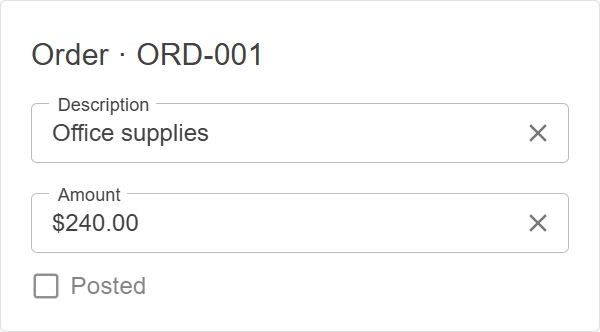
Before posting: Description and Amount are editable.
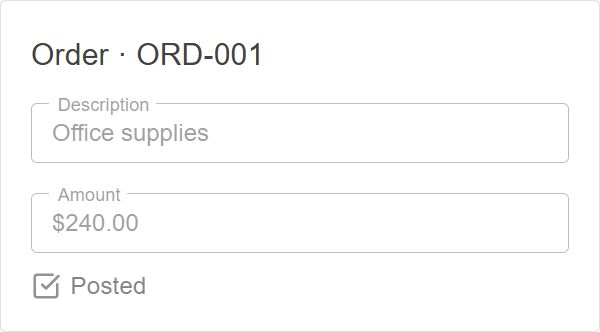
After posting: both fields are read-only.
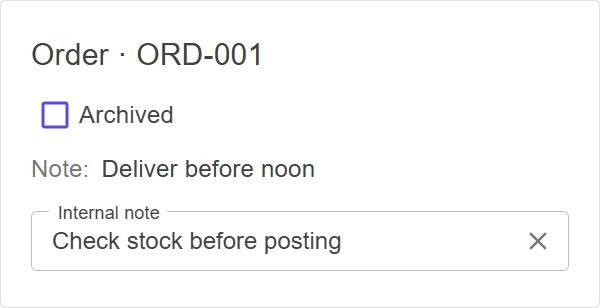
Active Order: Internal note is visible.
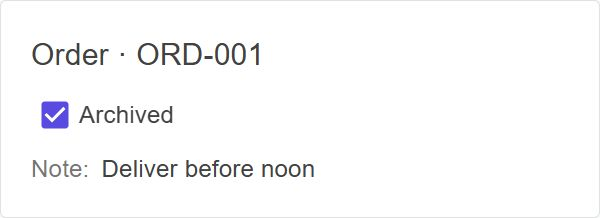
Archived Order: Internal note is hidden. Note stays visible.
- A property is read-only or hidden if any of its rules says so.
- Both rules block changes from server logic and API calls.
- Hidden also hides values in API responses. Server logic can still read them. Use permissions to control access.
- Hidden conditions must work in SQL. You cannot hide
Guid,Title, or natural-key properties. - ReadOnly skips properties without setters. It also accepts event arguments:
args => args.Entity.IsPosted.
See ReadOnly and Hidden for details.
React to changes and copy one member
When a user edits Amount, copy only Amount to the linked Invoice:
using Benevia.Core.Events.LogicContainers;

order.PropertyGroup<SharedFields>().Changed().Do((o, args) =>
{
    if (args.ChangedBy == ChangedBy.Direct && o.LinkedInvoice is { } invoice)
        args.CopyTo(invoice);
});
Editing Note copies only Note. Description and document numbers are outside the shared group.
The Invoice must already exist in the same EventContext.
CopyTo does not save. The code that made the edit must save both records.
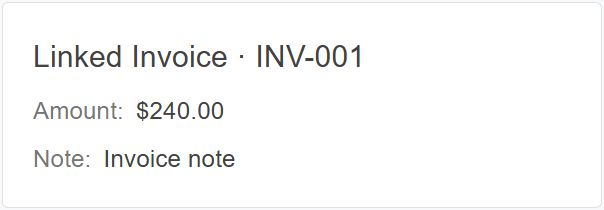
Order: edit Amount to $240.00.
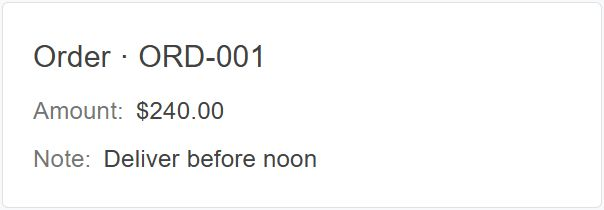
Linked Invoice: Amount becomes $240.00. Note stays unchanged. Refresh the Invoice to see the saved value.
ChangedBy.Direct copies direct edits, such as API updates.
It skips handler changes (LogicSubscriber) to prevent copying loops.
This also skips Apply note, which changes Note in a handler.
See ERP header synchronization to copy handler changes too.
Changed event details
Changed handles property changes, dirty notifications, and LoadAll collection changes.
It also accepts Do(entity => ...). args identifies the entity, property, cause, and old/new values.
Each event keeps its values after correction and validation, including during nested changes.
For dirty properties, OldValue is cached. NewValue computes once without firing Changed again.
CollectionChangedArgs gives the collection action and changed items. Clear reports Reset.
OldValue, NewValue, and CopyTo throw for collection events.
For scalar and reference changes, CollectionChangedArgs is null. Scalar list properties follow value rules.
Interface rules run once per underlying entity collection. Paged collections, virtual collections without change events, and proxies without underlying entity collections fail startup. Loading and restoring do not fire Changed. Changes to item properties need separate rules.
Copy a group
Copy to draft copies both Amount and Note to an existing draft Invoice:
[Method("Copy to draft", MethodType.Modify, SaveOnCompletion = true)]
public partial void CopyToDraft();
order.Method(o => o.CopyToDraft)
    .DisableIf(o => o.Draft == null)
    .Do(o =>
    {
        if (o.Draft is { } draft)
            order.PropertyGroup<SharedFields>().Copy(o, draft);
    })
    .OnSuccess("Shared fields copied to draft.");
SaveOnCompletion saves after the method. Copy does not save or create records.
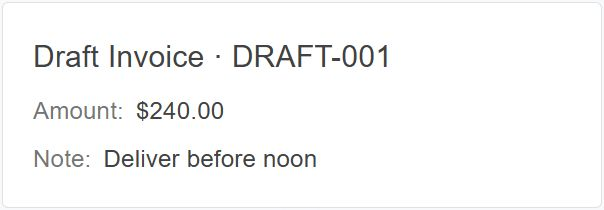
Source Order: copy Amount and Note.
Draft Invoice: both values now match the Order. Refresh the draft to see the saved values.
| Operation | Copies |
|---|---|
args.CopyTo(target) in Changed |
The property that changed. Throws for collection changes. |
group.Copy(source, target) |
All matching properties that can be copied. |
Copying matches the group type and property name. Normal setters, validation, and events still run.
- Both records must use the same active
EventContext. - The target property type must accept the source value. Core does not convert values.
- Missing groups, missing properties, and equal values are skipped.
Copyskips collections. Both methods skip virtual properties, properties without setters, and properties from unavailable features.- A read-only or hidden target causes an error. Pass
skipReadOnly: trueto skip it. - An error stops copying. Earlier changes stay pending; Core does not undo them.
Leave document numbers and other business keys out of the group.
Copy order and logic reloads
Copy reads each source property's accepted value in name order. It does not copy rejected source edits.
After reloading logic, get the group again before inspecting or copying it.
Recalculate a change summary
To list changed properties, declare TrackedChanges on the model and add a ChangeSummary text property:
var tracked = order.PropertyGroup<TrackedChanges>()
    .Add(o => new { o.Description, o.Amount, o.Note });

order.Compute(o => o.ChangeSummary)
    .From(o => string.Join(", ", tracked.GetPropertyStates(o)
        .Where(p => p.IsModified).Select(p => p.PropertyName)))
    .DirtyByGroup<TrackedChanges>();
DirtyByGroup watches current and later group properties, except the computed property itself.
The summary updates on the next read or save.
It supports LoadAll collection changes, but rejects paged collections.
Child properties need DirtyWithRelation(...).DirtyBy(...).
GetPropertyStates returns current states by name, including inherited and derived properties.
It skips unavailable features without reading values or loading references.
IsModified tracks accepted writes and collection changes, including equal and changed-back values.
See state rules.
Inheritance and startup
- Derived models inherit groups and rules once. Their additions do not change base or sibling models.
- Documents and their details have separate groups.
- Group rules run in registration order, after existing property rules. They also cover properties added later during startup.
- Rules run only for enabled features. All companies and features share the group's property list.
- Adding properties or rules after startup throws, even through saved builders. Record values remain editable unless a rule blocks changes.
- Repeated lookup returns the same group for that model Logic. Undeclared groups throw; reloading logic creates new groups.
Read the result
string description = order.PropertyGroup<PostedFields>().Describe();
The report lists properties, rules, registration sources, and lock state, including empty groups.
ERP adoption examples
Posting rules and copying between ERP documents
Finalized orders and their details
SalesOrderBL gives orders and details separate FinalizedOrderLock groups.
DocNumber uses a separate rule so finalization can fill an empty number.
Shared posting locks
IFinancialDoc declares PostedLock.
DocumentPostingBL defines the rule in Company, so it works without Financials.
Invoice logic and JournalBL add properties to it.
Keep IsPosted outside the group to allow unposting.
Details use separate groups; see ShipmentBL. Other rules may keep fields read-only after unposting.
ERP header synchronization
SalesOrderInvoiceSyncBL uses OrderInvoiceHeaderSync to copy selected Order and Invoice properties.
It validates targets and calls args.CopyTo(target, skipReadOnly: true) to skip read-only fields.
ERP copies handler changes too, so ChangedBy.Direct is not enough.
DocSync tracks each (source, target, property) copy to prevent loops.
Only the first handler sends a notification. A finally block clears tracking.