Protecting properties in a property group
Part of property groups.
ReadOnly and Hidden
// Business logic, inside a [RegisterLogic] method
var locked = invoice.PropertyGroup<ReadOnlyWhenPosted>()
    .Add(i => new { i.Date, i.Customer, i.Amount });

locked.ReadOnly().If(i => i.IsPosted);
- A property is read-only or hidden if any of its conditions says so.
- Both block changes from server logic and API calls.
- ReadOnly skips properties without setters. It also accepts event arguments:
args => args.Entity.IsPosted. - Hidden also masks values in API responses. Server logic can still read them. Use permissions to control access.
Hidden().If(...)needs a condition that works in SQL. You cannot hideGuid,Title, or natural-key properties.- Keep the condition property (
IsPosted) outside the group if users must be able to change it, such as with Undo post.
Example: Order page
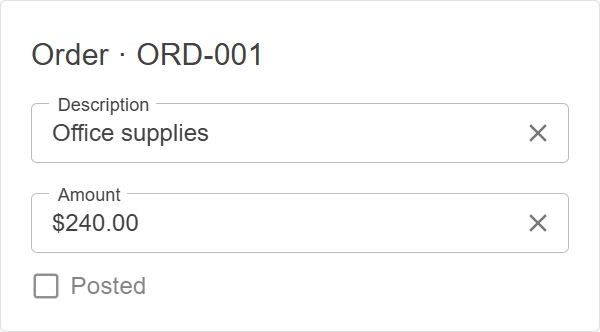
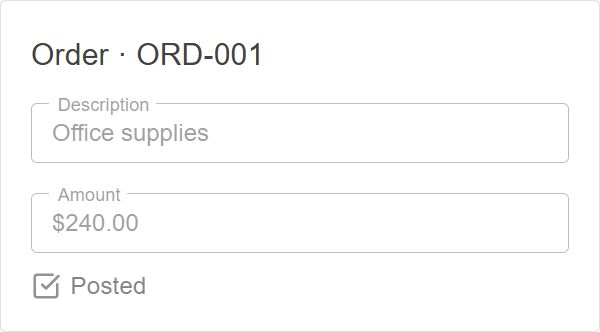
In the Order example, a PostedFields group is read-only while the Order is posted.
An InternalFields group is hidden while the Order is archived.
// Business logic, inside a [RegisterLogic] method
order.PropertyGroup<PostedFields>().ReadOnly().If(o => o.IsPosted);
order.PropertyGroup<InternalFields>().Hidden().If(o => o.IsArchived);
Before posting: Description and Amount are editable.
After posting: both fields are read-only.
Active Order: Internal note is visible.
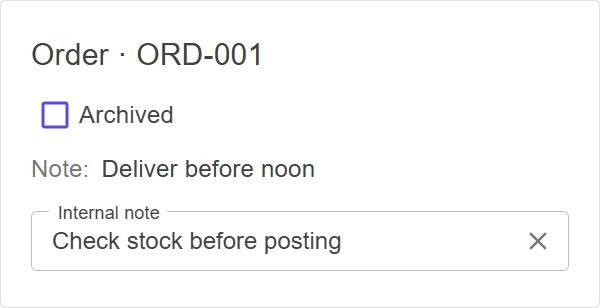
Archived Order: Internal note is hidden. Note stays visible.

Note on methods
A group holds properties only. Methods cannot join a group, so ReadOnly and Hidden do not lock them.
To lock a method with the same condition, add DisableIf to the method. See Methods.
// Business logic, inside a [RegisterLogic] method
invoice.Method(i => i.Post).DisableIf(i => i.IsPosted);