Copying with property groups
Part of property groups.
Two calls copy property values between entities. Both match properties by name and use the normal setters and validation.
| Call | Copies | Use it to |
|---|---|---|
group.Copy(source, target) |
Every property in the group | Duplicate a record, or default one from a template |
args.CopyTo(target) |
One changed property, inside group.Changed().Do(...) |
Keep two records in sync |
Rules for both calls:
- Source and target must share an active
EventContext. The target property type must accept the source value. Core does not convert values. - Missing groups, missing properties, and equal values are skipped.
Copyskips collections. Both sides need setters and enabled features.- Writable virtual properties are copied, including computed properties.
- Read-only or hidden targets reject writes. Pass
skipReadOnly: trueto skip them. - An error stops copying. Earlier changes stay pending; Core does not undo them.
- Neither call saves or creates records. Natural keys (
Customer.Id), document numbers, and other business keys should normally not be in copy groups. Other required properties should often be included. Copyreads each source property's accepted value in name order. It does not copy rejected source edits.- After reloading logic, get the group again before copying.
Scenario 1: A method that copies a contact
A CopyContact method creates a new contact and copies the shared fields onto it.
// Contact.cs (model)
[PropertyGroup<ContactCopy>]
public partial class Contact
{
    [Method("Copy contact", MethodType.Modify)]
    public partial void CopyContact();
}
// ContactCopy.cs (model)
public sealed class ContactCopy : IPropertyGroup;
// ContactBL.cs (business logic)
[Logic]
public class ContactBL(Contact.Logic contact)
{
    [RegisterLogic]
    public void CopyContactMethod()
    {
        var copyFields = contact.PropertyGroup<ContactCopy>()
            .Add(c => new { c.Company, c.JobTitle, c.Email, c.Phone, c.Address });

        contact.Method(c => c.CopyContact).Do((source, args) =>
        {
            var copy = new Contact(args.Context);
            copyFields.Copy(source, copy);
            copy.FirstName = source.FirstName;
            copy.LastName = $"{source.LastName} (copy)";
        });
    }
}
new Contact(args.Context)creates the new record in the same context, whichCopyrequires.- The group lists only the fields that every copy should carry. Set identifying fields such as the name in the method.
NOTE: We have not done a lot with copying. This does not copy children of an entity. I expect we should have the ability to copy an Invoice (Header and detail) or a customer (Account, Contact, Addresses). I expect to make future changes when we work on copying many entities- Glenn
Scenario 2: Default a new product from its category
A category names a default product, category.DefaultEntity, that holds the starting values for new products in that category.
When a new product gets a category, copy those values onto it.
// Product.cs (model)
public sealed class CategoryDefaults : IPropertyGroup;

[PropertyGroup<CategoryDefaults>]
public partial class Product;
// ProductBL.cs (business logic)
[Logic]
public class ProductBL(Product.Logic product)
{
    [RegisterLogic]
    public void DefaultFromCategory()
    {
        var defaults = product.PropertyGroup<CategoryDefaults>()
            .Add(p => new { p.Description, p.Weight, p.Price }); //Sku is not included

        product.OnChanged(p => p.Category)
            .Do(p =>
            {
                if (!p._State.IsNew || p.Category?.DefaultEntity is not { } template)
                    return;

                defaults.Copy(template, p, skipReadOnly: true);
            });
    }
}
IsNewlimits the copy to new products, so changing the category on a saved product leaves its values alone.skipReadOnly: trueskips any property that is currently read-only instead of throwing.Copyoverwrites existing values. To fill only empty properties, use a Default event for each property instead.
Keep two records in sync
Use args.CopyTo in a Changed handler to copy each change as it happens:
// Business logic, inside a [RegisterLogic] method
contact.PropertyGroup<SyncedToPeerContact>()
    .Add(c => new { c.Email, c.Phone })
    .Changed().Do((entity, args) =>
    {
        if (args.ChangedBy == ChangedBy.Direct && entity.Peer is { } peer)
            args.CopyTo(peer);
    });
CopyTo throws for collection events.
CopyTodoes not save. The code that made the edit must save both records, and the target must already exist in the sameEventContext.ChangedBy.Directcopies direct edits, such as API updates. It skips changes made by handlers (LogicSubscriber), which prevents copying loops.- To copy handler changes too, track each copy to prevent loops. See ERP header synchronization.
Example: Order page
In the Order example, a SharedFields group holds Amount and Note on both Order and Invoice.
The group is not tied to the contact scenarios above.
Copy one changed property with CopyTo
When a user edits Amount, copy only Amount to the linked Invoice:
// Business logic, inside a [RegisterLogic] method
order.PropertyGroup<SharedFields>().Changed().Do((o, args) =>
{
    if (args.ChangedBy == ChangedBy.Direct && o.LinkedInvoice is { } invoice)
        args.CopyTo(invoice);
});
Editing Note copies only Note. Description and document numbers are outside the shared group. This skips Apply note, which changes Note in a handler.
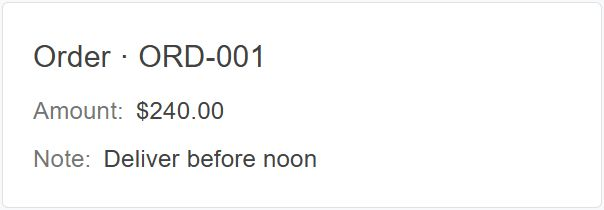
Order: edit Amount to $240.00.
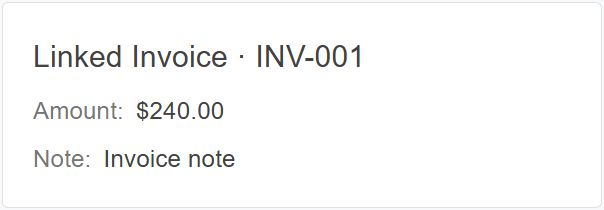
Linked Invoice: Amount becomes $240.00. Note stays unchanged. Refresh the Invoice to see the saved value.
Copy a whole group with Copy
Copy to draft copies both Amount and Note to an existing draft Invoice:
// Order.cs (model)
[Method("Copy to draft", MethodType.Modify, SaveOnCompletion = true)]
public partial void CopyToDraft();
// Business logic, inside a [RegisterLogic] method
order.Method(o => o.CopyToDraft)
    .DisableIf(o => o.Draft == null)
    .Do(o =>
    {
        if (o.Draft is { } draft)
            order.PropertyGroup<SharedFields>().Copy(o, draft);
    })
    .OnSuccess("Shared fields copied to draft.");
SaveOnCompletion saves after the method. Copy does not save or create records.
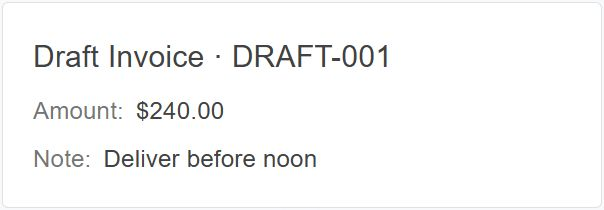
Source Order: copy Amount and Note.
Draft Invoice: both values now match the Order. Refresh the draft to see the saved values.